ACTIVATION GUIDE
Adobe Acrobat DC Pro 2019 - Lifetime License
Download the installer using any of the links below:
(more than one is provided in the event of either being unavailable)
You will be directed to a download page:
IGNORE THE MESSAGE "THERE WAS A PROBLEM WITH THE NETWORK".
This is an automated message and has no effect on you accessing or
downloading the file.
Click the "DOWNLOAD" button to obtain the installation file.
You will then be prompted to download the file, approx 600-700Mb.
IMPORTANT !
Windows built-in antivirus may detect the Adobe cabinet file (compressed archive Data1.CAB/Data2.CAB) as being a potential threat and delete the file.
This is a false detection, and to avoid this happening it is recommended that you temporarily disable Windows Antivirus. This can be done easily:
Using the Windows Security app .......
Open the Start menu
Search for Windows Security
Select Virus & threat protection
Select Manage settings
Under Real-time protection, toggle the switch to Off
(Restarting your computer will re-enable Windows Antivirus)
ALSO:
Most Adobe software relies on a library file AMTLIB.DLL which is an integral part
of their software, and subject to the attention of hackers.
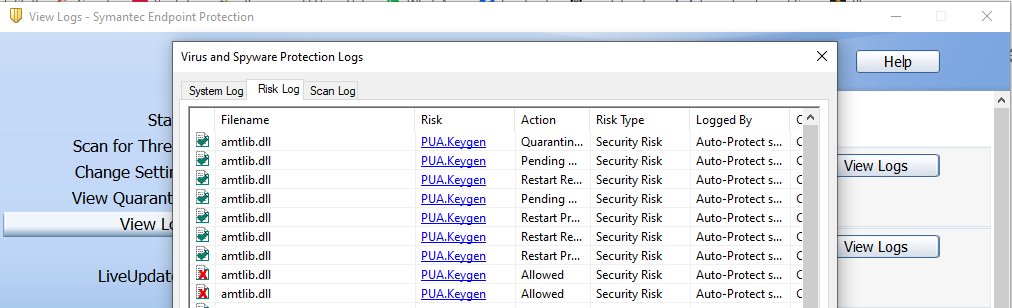
Due to this, some AV programs with identify this file as a potential threat and it
may be deleted or quaratined by the AV engine.
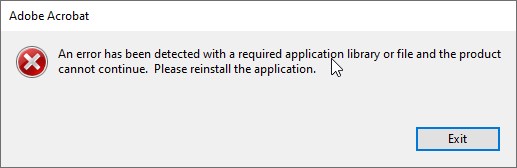
You may see a dialog box appear stating 'an error has been detected with a required application library' which indicates the file has been removed.
To recitfy this issue, which is commonplace, you can add the file AMTLIB.DLL
as an exception to scans and threats list in your AV program.
You can then repair the installation, either through Control Panel - Programs and
Features, or in the help menu of Acrobat.
NEXT:
Unzip/extract files to a folder before running setup.
(Right-click on the downloaded file and select 'Extract Files' and follow the prompts.
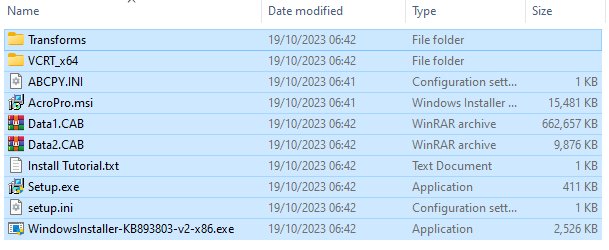
The extracted installer files with be shown after extraction.)
THERE SHOULD BE 10 ITEMS WITHIN THE EXTRACTED FOLDER
IF THERE IS NOT, AND THE DATA1.CAB FILE IS MISSING, YOUR ANTIVIRUS
IS NOT DISABLED !!
INSTALLATION CANNOT PROCEED WITHOUT THIS FILE - DISABLE THE ANTIVIRUS AND RE-EXTRACT THE FILES TO THE FOLDER
It is recommended that any previous/alternate versions of Acrobat are uninstalled fully prior to installation and that your version of Windows is fully up-to-date.
Enter your product key when prompted.
Enjoy your new Adobe product.
Regards
David
Adobe Acrobat DC Pro 2019 - Lifetime License
Download the installer using any of the links below:
(more than one is provided in the event of either being unavailable)
You will be directed to a download page:
IGNORE THE MESSAGE "THERE WAS A PROBLEM WITH THE NETWORK".
This is an automated message and has no effect on you accessing or
downloading the file.
Click the "DOWNLOAD" button to obtain the installation file.
You will then be prompted to download the file, approx 600-700Mb.
IMPORTANT !
Windows built-in antivirus may detect the Adobe cabinet file (compressed archive Data1.CAB/Data2.CAB) as being a potential threat and delete the file.
This is a false detection, and to avoid this happening it is recommended that you temporarily disable Windows Antivirus. This can be done easily:
Using the Windows Security app .......
Open the Start menu
Search for Windows Security
Select Virus & threat protection
Select Manage settings
Under Real-time protection, toggle the switch to Off
(Restarting your computer will re-enable Windows Antivirus)
ALSO:
Most Adobe software relies on a library file AMTLIB.DLL which is an integral part
of their software, and subject to the attention of hackers.
Due to this, some AV programs with identify this file as a potential threat and it
may be deleted or quaratined by the AV engine.
You may see a dialog box appear stating 'an error has been detected with a required application library' which indicates the file has been removed.
To recitfy this issue, which is commonplace, you can add the file AMTLIB.DLL
as an exception to scans and threats list in your AV program.
You can then repair the installation, either through Control Panel - Programs and
Features, or in the help menu of Acrobat.
NEXT:
Unzip/extract files to a folder before running setup.
(Right-click on the downloaded file and select 'Extract Files' and follow the prompts.
The extracted installer files with be shown after extraction.)
THERE SHOULD BE 10 ITEMS WITHIN THE EXTRACTED FOLDER
IF THERE IS NOT, AND THE DATA1.CAB FILE IS MISSING, YOUR ANTIVIRUS
IS NOT DISABLED !!
INSTALLATION CANNOT PROCEED WITHOUT THIS FILE - DISABLE THE ANTIVIRUS AND RE-EXTRACT THE FILES TO THE FOLDER
It is recommended that any previous/alternate versions of Acrobat are uninstalled fully prior to installation and that your version of Windows is fully up-to-date.
When you have uninstalled any old versions of Acrobat
or Acrobat Reader you can thoroughly clean old Acrobat components from your
PC using the Adobe Cleaner tool – available to download here:
Enter your product key when prompted.
Enjoy your new Adobe product.
Regards
David